
What an Atoka County Court Docket Is
A docket is the running list of every event in a case. The court clerk adds a new line each time something is filed, scheduled, ruled on, or paid. Each line carries a date, a short code, and a plain description. Read top to bottom, the docket tells the story of a case from start to finish. It shows when the matter opened, who the parties are, what hearings were set, and how the case ended. In Atoka County, these dockets are District Court records kept by the Court Clerk.
A docket is not the same as the full case file. The docket is the index. The full file holds the actual documents, such as petitions, motions, orders, and signed decrees. A docket line might read "order admitting will to probate," while the order itself is a separate paper in the file. Some of those papers appear online as scanned links. Others are marked "Document Available at Court Clerk's Office," which means the page exists only on paper at the courthouse counter.
The split between the list and the documents matters when you need proof. A printed docket page is enough to read a case history. It is not a certified copy, and it is not what a court accepts as evidence. The table below sets the two side by side.
| Docket | Full Case Record | |
|---|---|---|
| Format | List of dated entries | The actual filed documents |
| Access | Usually online and free | Some online; certified copies at the clerk |
| Detail | Short codes and labels | Full text of each filing |
| Use | Track status and dates | Legal review, proof, evidence |
Look Up Atoka County Dockets Online
Two free statewide systems carry most Atoka County court dockets. The Oklahoma State Courts Network docket home, known as OSCN, runs a case-number lookup with a county dropdown that includes Atoka County District Court. On Demand Court Records, known as ODCR, is a second portal that lists Atoka among its participating courts. ODCR supports searches by court, party name, party type, and case type. Its pricing page describes free, unlimited searching and docket viewing, though some downloads or enhanced features may ask for a login or a fee.
Both systems read the same way once you open a case. A short workflow keeps the search clean.
- Decide whether the case is a county District Court matter or a city case. District Court dockets are on OSCN and ODCR, while City of Atoka tickets and ordinance cases stay with the Atoka Municipal Court.
- Open OSCN or ODCR and choose Atoka County District Court from the court list.
- Enter a case number if you have one, such as TR-2025-00828. If not, search by party name in "Last, First" form.
- Pick a case type when name searching, such as traffic, probate, or family, to narrow the results.
- Open the matching case to load the full docket, then read the warning that the online page is not the official record.
- Scroll the docket entries to check parties, hearings, counts, amounts, and any document links.
- For certified copies, sealed files, or pages marked available only at the clerk's office, call or visit the Court Clerk.
Disposed traffic, felony, and misdemeanor balances, plus some undisposed citations, can be cleared through the ODCR online payment page.
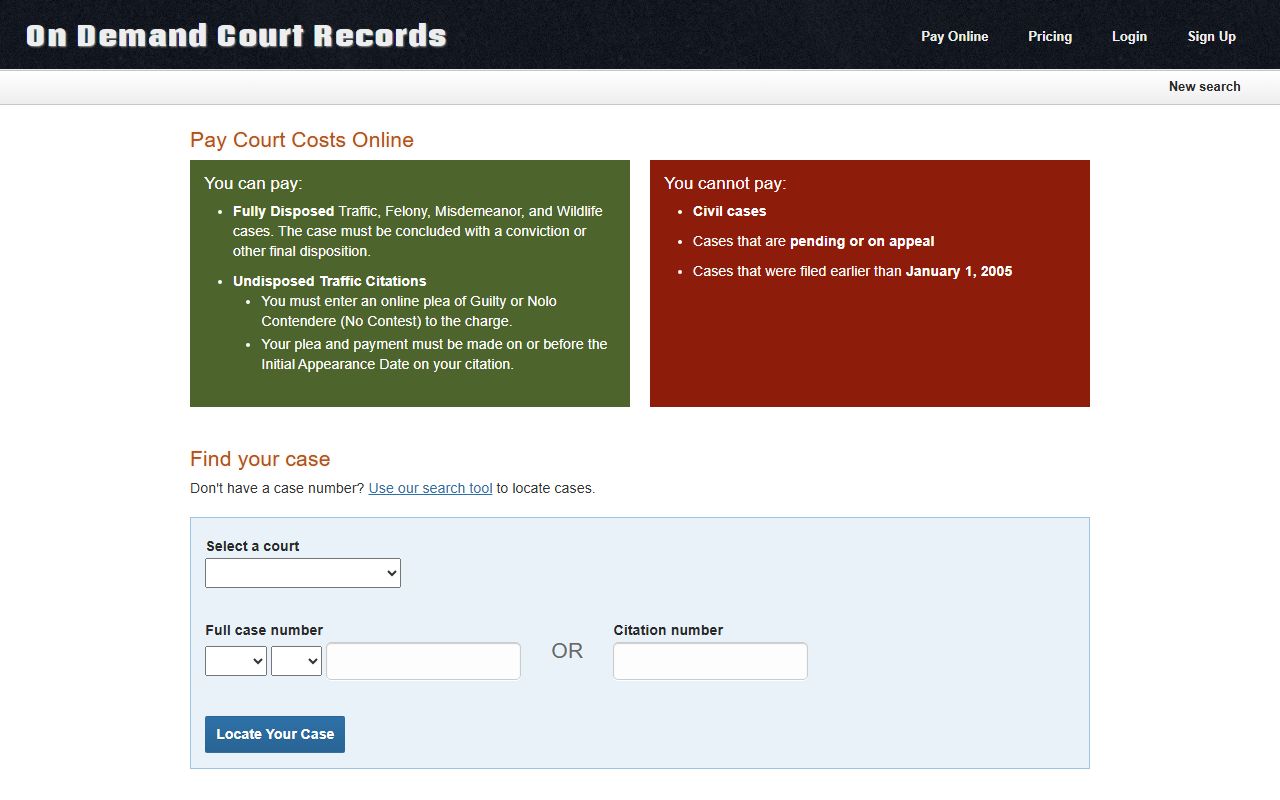
Paying or entering an online plea still posts to the same docket. The new entry and any added fee show up the next time the case is opened. For District Court balances, the OSCN e-Payments service covers selected courts and works by case, citation, or payment-plan number.
Case Number Lookup and Prefixes
Every Atoka County case number starts with a prefix that signals the type of case. The two letters tell you which docket you are reading before you open a single entry. A number like TR-2025-00828 is a traffic case from 2025. A number like PB-2025-00050 is a probate matter. Matching the right prefix saves time when a name search returns several cases at once.
| Prefix | Case Type |
|---|---|
| TR | Traffic |
| PB | Probate, wills, and estates |
| CF | Felony criminal |
| CM | Misdemeanor criminal |
| SC | Small claims |
| CV | Civil |
| FD | Family and divorce |
| PO | Protective order |
The OSCN case-number lookup is the fastest path when the full number is known. Type the number, confirm Atoka County District Court is selected, and the docket loads. When only a name is known, ODCR name search is the better tool, since it supports partial and "Last, First" matches. The same prefixes appear on payment screens, so a citation or case number entered for payment routes to the matching record.
Note: A single name search can return several Atoka County cases, so the prefix and year on each case number are the quickest way to spot the matter you want.
What an Atoka County Docket Entry Shows
Each docket entry is a small grid of facts. The columns stay the same from case to case, which makes a docket easy to scan once the labels are clear. A single line answers when, what, who, and how much.
- Date
- When the clerk entered the action.
- Code
- A short tag for the filing or event type.
- Description
- Plain text of what happened, such as a motion, notice, or order.
- Count
- Which charge or claim the entry applies to.
- Party
- The person or office tied to the entry.
- Amount
- Any fee, fine, or assessment posted on that line.
Above the entry table, a case page also lists scheduled events. An event shows a hearing type, a date, a time, and a docket label. Financial lines carry their own running list. The samples for Atoka County include filing fees, fines, court costs, courthouse security, an OCIS revolving assessment, the district attorney revolving fund, victim services, the trauma fund, CASA, and the court clerk preservation fund. Each posts as its own dated row with an amount.
Documents sit at the end of many entries. Some carry a TIFF or PDF link you can open in the browser. Others read "Document Available at Court Clerk's Office," which signals a paper-only record. Warrant activity shows here too, with lines such as "issue bench warrant" or "failure to appear" tied to a case.
Note: A line that reads "issue bench warrant" or "failure to appear" is a warrant indicator, but only the issuing court can confirm whether a warrant is still active.
Sample Atoka Traffic Docket
The public docket for case TR-2025-00828 shows how a real Atoka County traffic case reads. The style is State of Oklahoma versus the defendant. It was filed on June 30, 2025, with Judge Preston Harbuck assigned. The parties include the defendant, the District Attorney, the arresting officer, and the arresting agency, the Oklahoma Highway Patrol. The single count is operate vehicle while driver license suspended, first offense.
The full entry list for this case is public on the OSCN traffic docket for TR-2025-00828.
Each line on that page maps to one row in the inventory below, from the citation data to the bench warrant event. Deeper coverage of citation cases lives in the Atoka County traffic court records.
| Field | What It Shows |
|---|---|
| Case number | TR-2025-00828 |
| Court | Atoka County District Court |
| Case type | Traffic |
| Filed | June 30, 2025 |
| Judge | Preston Harbuck |
| Style | State of Oklahoma v. the defendant |
| Parties | Defendant, District Attorney, arresting officer, and arresting agency (Oklahoma Highway Patrol) |
| Count | Operate vehicle while DL suspended, first offense |
| Citation data | Citation number, location of offense, county, license class, vehicle make, model, color, tag, and bond amount |
| Events | Appearance; bench warrant for failure to appear |
| Fee entries | File-and-enter, fine, DA revolving fund, trauma fund, OCIS revolving assessment, courthouse security, victim services, child abuse multidisciplinary account |
| Documents | Some court-minute entries link TIFF or PDF; others marked available at the Court Clerk's office |
Sample Atoka Probate Docket
Case PB-2025-00050 is a probate matter in the same District Court. It opened on November 17, 2025, with Judge D. Clay Mowdy. The probate issue is a petition for probate of a will, the request that asks the court to accept a will and start handling the estate. The docket lists the parties, the attorney of record with a mailing address, and a long string of filings.
The hearing events and filings appear in order on the OSCN probate docket for PB-2025-00050.
Reading the entries top to bottom traces the estate from the first petition to the final decree. The sequence on this docket runs in clear stages.
- File and enter the petition for probate of the will.
- Order for hearing and notice of hearing set the first court date.
- Affidavit of mailing and affidavit of publication confirm that notice went out.
- Order admitting the will to probate, then appointment and letters of administration.
- Notice to creditors and a general inventory and appraisement of the estate.
- Final account, notice of settlement, and an order fixing the time for settlement.
- Order allowing the final account and the final decree of distribution and discharge.
The same docket records what the estate paid. The sample shows a file-and-enter petition charge of $135.00, an OCIS revolving fund assessment of $25.00, a Lengthy Trial Fund charge of $10.00, a CASA assessment of $10.00, a Courthouse Security fee of $10.00, and a Court Clerk Preservation Fund charge of $10.00. Those figures are sample amounts from one case, not a full or current fee schedule for every probate. Estate filings get fuller treatment on the Atoka County probate records page.
Which Courts Publish Atoka County Dockets
Not every court that touches an Atoka County case posts its docket the same way. The District Court is the one whose dockets reach OSCN and ODCR. City cases follow a different path and stay with the city. Appeals move up to the statewide courts and show in a separate part of the OSCN system.
- Atoka County District Court: civil, criminal, traffic, probate, family, small claims, and protective-order dockets posted on OSCN and ODCR.
- Atoka Municipal Court: city ordinance, city traffic, parking, and municipal warrant matters, kept at City Hall rather than in the District Court system.
- Oklahoma appellate courts: Supreme Court, Court of Criminal Appeals, and Court of Civil Appeals dockets that appear in the statewide OSCN court system.
Municipal dockets are the common gap. A city ticket, a parking fine, or a municipal bench warrant usually never shows on OSCN, since the Atoka Municipal Court keeps those records at City Hall. The statewide Oklahoma District Courts framework sets the rest, with district judges hearing both civil and criminal matters and the Court Clerk filing each entry.
Note: A state or county traffic citation can appear on OSCN, but a city traffic ticket usually does not, so check both the District Court and the Municipal Court.
Verifying With the Court Clerk
Online dockets are a starting point, not proof. Every OSCN case page repeats that the information is not an official record, should not be relied on for accuracy or completeness, and should be verified with the official record keeper. For Atoka County District Court cases, that record keeper is the Court Clerk at the courthouse.
Atoka County Court Clerk
Atoka County Courthouse
200 East Court Street
Atoka, OK 74525
580-889-3565
Fax 580-889-5075
Monday to Friday, 8:30 a.m. to 4:30 p.m.
State law backs this access. The Oklahoma Open Records Act keeps court records open unless a statute makes them confidential, and it requires public offices to allow inspection and copying during business hours under 51 O.S. Section 24A.6. Older estate files, paper dockets, and documents not scanned online sit at the clerk's counter. Call ahead before driving in, since the office can confirm what is on file and what a certified copy will cost.